
Payroll in minutes.
Margin on every client.
UBCC HRM streamlines time entry, lets employees onboard themselves and routes timesheets to managers for approval. Approved payroll entries go straight into UBCC, and employees see every pay stub in HRM. You run payroll faster, and you set the price.

Good for your business.
Better for your clients.
You already know payroll. HRM takes care of everything around it, from onboarding and time entry to approvals and pay stubs, so the data you receive is clean, approved and ready to import.
For you, the processor
Less data entry, more marginStreamlined time entry
Employees clock in on a kiosk time clock at the workplace and hours flow into one clean payroll view. No timesheets to chase, nothing to re-key. Managers approve the timesheets, and the approved payroll entries arrive in UBCC, ready for your clerk to run payroll.
Self-service employee onboarding
New hires fill in their W-4, I-9 and other onboarding documents themselves. Forms are completed automatically from what they enter, so you get complete employee data without typing it in.
Employee management
Pay raises, rate changes and employee details are recorded in HRM, so changes reach payroll without emails or phone calls.
Payroll entry with manager approvals
One payroll entry screen per pay period. Managers review and approve hours and overtime before anything reaches you.
Every pay stub in one place
Employees keep getting their pay stub email as today. HRM adds one place where they can see every pay stub and their full pay history.
A new recurring revenue line
Pay a partner fee of $60 per company + $6 per employee, set your own client price, and keep the difference every month. Clients who manage their employees and HR with you are also harder to replace.
For your employer clients & their employees
One place for time, people & payKiosk time clock
Employees clock in and out on a kiosk time clock at the workplace, replacing the separate time-tracking app many clients pay for today.
Employee self onboarding
New hires onboard themselves on the web, on their phone or computer, before day one. Their W-4, I-9 and other documents are filled in automatically from what they enter.
WOTC
Support for Work Opportunity Tax Credit (WOTC) screening, without extra spreadsheets.
Approvals & pay raises
Managers approve hours and overtime and record raises in one place, before anything goes to payroll.
Pay stubs in HRM
On top of the pay stub email they already get, employees can open every pay stub and their full history in HRM, without having to ask the office.
Compliance support
Help keeping employee records and requirements in order, so owners know what they need to have in place.
Clock in at the workplace.
Hours land in payroll.
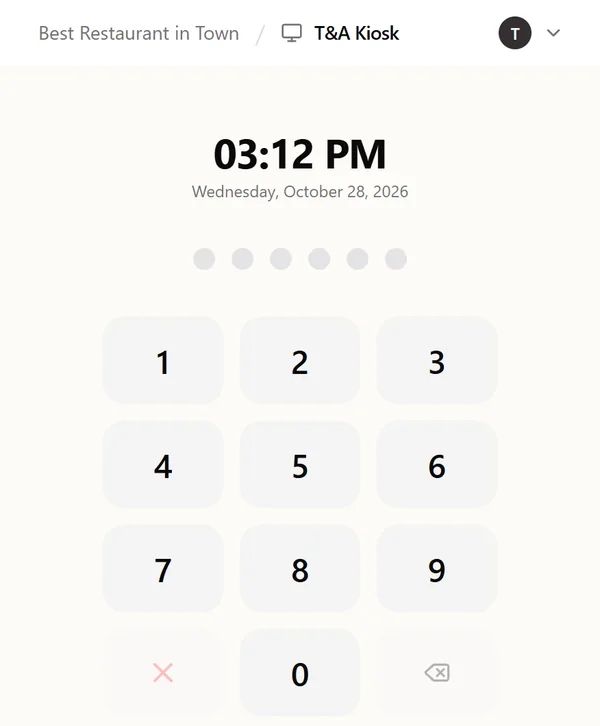
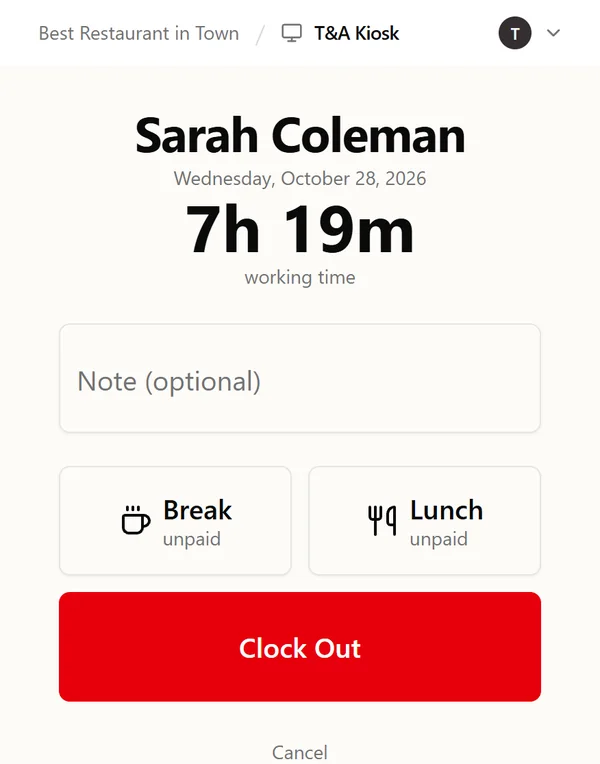
Employees enter their PIN on a kiosk at the workplace and clock out with breaks and lunch recorded. Their hours flow into the payroll entries their manager approves, ready for your clerk to run payroll in UBCC.
- PIN clock in and out on a shared kiosk
- Unpaid breaks and lunch recorded at clock out
- No separate time-tracking app for your clients to pay for
Your process stays the same.
It just gets faster.
UBCC remains your payroll engine. Every payroll runs through the same four steps.
↻ Repeats every payroll
Employees clock in & out
On the kiosk time clock at the workplace. Hours land in HRM on their own.
EmployeeManager approves timesheets
The manager reviews hours and overtime and approves the timesheets in HRM.
EmployerPayroll entries flow into UBCC
Approved payroll entries go into UBCC, and your payroll clerk runs payroll as usual.
YouEmployees see pay stubs
Every pay stub is in HRM, in addition to the email employees already get.
EmployeeOnboarding a new employee
One time, per new hire- 1InviteThe employer invites the new hire from HRM.
- 2Employee fills in the formsW-4, I-9 and other documents, on the web. Nothing to install.
- 3Data lands in the systemComplete employee data, ready for payroll. No re-keying.
What would HRM earn you this year?
Plug in your numbers and see your monthly profit and time saved.
Your client price is editable; $80 + $8 is our recommended list price. The partner fee is fixed.
Assumes 173 hours per full-time clerk per month (40 h × 52 weeks ÷ 12).
Your monthly profit
$3,400
$40,800 per year
+ 222 hours a month back for your team ≈ $93,441 a year
Breakdown
- Revenue from clients / mo
- $13,600
- HRM partner fee / mo
- $10,200
- Labor savings / mo
- $7,787
- Total annual benefit (profit + labor savings)
- $134,241
Assumptions: labor savings = clerks × 173 h/month (40 h × 52 ÷ 12) × 64.3% (beta average) × hourly cost. Illustrative estimate; your results will vary.
Founding Partners get a head start.
UBCC HRM is live and already running payroll for processors today. Founding Partners get the first 3 months free for all their existing UBCC clients, plus priority support and a say in what we build next.
Join by December 31, 2026 to become a Founding Partner
- 3 months free for all your existing UBCC clientsNo partner fee and no client charge
- Priority supportYour questions go to the front of the line
- Shape the roadmapA direct line to the product team; you help decide what we build next
- Ready-made sales materialsClient-facing deck, one-pager and short product video
- Demo companySo you can show HRM to your clients
Heard from the field
Since we started using HRM, our payroll processing time dropped by about 70%. That's time we now spend on our clients instead of on data entry.
We want every new client on HRM. It makes our life easier and gives our clients great features.
HRM gives us modern features that drastically reduce our clients' workload and enable us to compete with companies much larger than we are.
Questions processors ask us
Anything else? Reply to our email. A real person on our team will answer.
Do I have to change how I run payroll in UBCC?
No. UBCC stays your payroll system. Managers approve the timesheets in HRM, the approved payroll entries go into UBCC, and you run payroll as usual.
Who sets the price my clients pay?
You do. Your partner fee is $60 per company + $6 per employee per month. We recommend charging clients our standard list price of $80 per company + $8 per employee per month. Whatever you charge above the fee is your margin. Founding Partners (everyone who joins by December 31, 2026) get the first 3 months free for all their existing UBCC clients.
How is the partner fee billed?
Monthly, to you, based on the client companies and active employees you have on HRM. You bill your clients directly. Confirm billing details
What do my clients' employees need?
Nothing to install. HRM is a website employees open in the browser on their phone or computer to complete onboarding forms and see their pay stubs. There's no app to download from the app stores. They clock in and out on the kiosk time clock at the workplace, and employers use HRM in the browser to approve timesheets and manage their people.
Can I see the employee side before I offer it?
Yes. We'll walk you through both the employer and the employee experience, and Founding Partners get a demo company to show prospects.
How do I get started?
Book a 20-minute intro call. We'll set up your account, agree on terms, and help you pick the first clients to move over.
Faster payroll for you.
A better product for your clients.
Book a 20-minute intro call with our team. No commitment, just a look at HRM and your numbers.